Film Grain Node
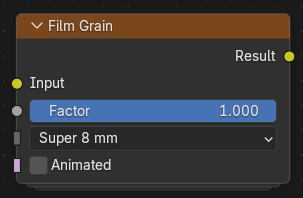
The Film Grain simulates the appearance of photographic film by adding realistic grain and subtle optical characteristics to an image.
Several presets are provided to emulate the look of different film gauges and stocks, while custom controls allow fine adjustment of the grain characteristics.
Inputs
- Image
Standard color input.
- Factor
Blends the generated film grain with the input image.
A value of zero disables the effect, while one applies the full effect.
- Preset
Selects a predefined film profile.
- 8 mm Caffenol:
Homemade Caffenol-processed film with heavy grain, high contrast, and an uneven appearance.
- 8 mm Home Movie:
Large luminance grain with reduced sharpness and contrast.
- Super 8 mm:
Large animated grain with a pronounced texture.
- 16 mm Broadcast:
Moderate grain with good contrast, typical of broadcast film.
- 16 mm Indie Cinema:
Soft overall appearance with dense, punchy midtone grain.
- 35 mm Portra 400:
Fine, pleasant grain suitable for portrait photography.
- Super 35 mm:
Balanced grain typical of modern cinema film.
- 70 mm Cinema:
Very fine, clean grain suitable for high-resolution cinema formats.
- Custom:
Enables manual control of the film characteristics.
- Animated
Generates a different grain pattern every frame.
When disabled, the grain pattern remains fixed for the duration of the sequence.
Custom Inputs
- Film Gauge
Controls the simulated physical film size.
Smaller gauges produce larger, more visible grain, while larger gauges produce finer grain.
- 8 mm:
Largest grain.
- 16 mm:
Medium-large grain.
- 35 mm:
Fine grain.
- 70 mm:
Finest grain.
- Style
Selects the overall grain response and optical characteristics.
- Xpro Sharp:
Simulates cross-processed film with increased sharpness and contrast.
- Cinematic Gritty:
Produces a coarse, high-contrast cinematic appearance.
- Home Movie:
Simulates consumer film with softer detail and heavier grain.
- Studio Broadcast:
Produces a cleaner, more neutral appearance.
- Pro Photography:
Fine photographic grain with balanced color response.
- Cinematic Soft:
Soft cinematic rendering with subtle grain.
- Custom Style:
Enables manual adjustment of all film characteristics.
Custom Controls
Available when both Preset and Style are set to Custom.
- ISO
Controls the simulated film sensitivity.
Higher ISO values produce stronger and coarser grain.
- Softness
Simulates halation and optical softness around edges.
Higher values soften fine detail and introduce subtle bloom.
- Acutance
Controls perceived edge sharpness.
Increasing this value enhances larger details and can produce a subtle halo around high-contrast edges.
- Coarseness
Controls the size and roughness of the grain structure.
- Patchiness
Controls the uniformity of the grain distribution.
Higher values create uneven grain patterns and can introduce a subtle flickering appearance when Animated is enabled.
- Saturation
Controls the colorfulness of the grain.
- Luma Bias
Controls how strongly grain responds to image brightness.
- Texture Scale
Scales the size of the generated grain texture.
Outputs
- Image
The input image with the simulated film grain applied.